

Η Microsoft ανακοίνωσε χθες ουσιαστικά το βράδυ, την κυκλοφορία του Windows 11 Preview Build 22523 στους Dev Channel Insiders. Σε αυτήν την έκδοση, η Microsoft έχει μετακινήσει μερικές ρυθμίσεις από τον Πίνακα Ελέγχου στην εφαρμογή Ρυθμίσεις. Αυτή η κατασκευή συνοδεύεται επίσης με αρκετές διορθώσεις σφαλμάτων. Βρείτε το πλήρες αρχείο καταγραφής αλλαγών παρακάτω. Όπως βλέπετε η ενημέρωση εγκαταστάθηκε μια χαρά και στον επίσημα μη υποστηριζόμενο υπολογιστή μου.
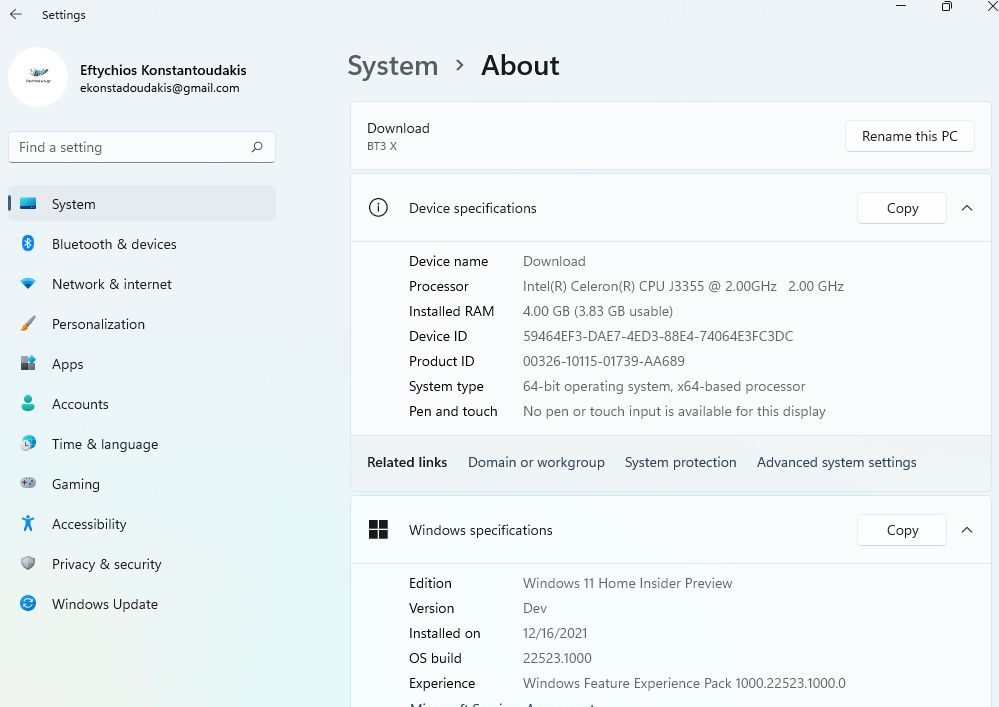
Ας δούμε όμως τις βελτιώσεις αλλά και τις αλλαγές που επιφέρει η νέα έκδοση. Σας τις παραθέω όπως τις δίνει η Microsoft.
CHANGES AND IMPROVEMENTS
- We have rolled out snap groups in ALT + TAB and Task View just like when you hover open apps on the taskbar, and you see them there, to all Insiders in the Dev Channel.
- When File Explorer is open to This PC, the add media server and (if appropriate) remove media server option is now available when you click the “…” in the command bar.
- As part of our ongoing effort to bring over settings from Control Panel into the Settings app:
- Links to Programs & Features in Control Panel will now open to Settings > Apps > Installed Apps.
- We’re moving Uninstall Updates (for cumulative updates, etc.) from Control Panel to a new page in Settings under Settings > Windows Update > Update History.
FIXES
[Taskbar]
- Fixed an issue related to text input initialization that could lead to the shell (for example, Start menu and search) becoming non-responsive on ARM64 PCs.
- The battery icon tooltip should no longer unexpectedly show a percent above 100.
- App icons should no longer overlap the date & time on secondary monitors when there are a lot of open apps.
[File Explorer]
- Did some work to address an issue that was leading to losing keyboard focus sometimes after pressing Enter when using F2 to rename OneDrive files.
[Spotlight collection]
- After enabling spotlight collection, your first image (after Whitehaven Beach) should arrive a little faster now.
- Added icons to the spotlight collection context menu entries.
[Input]
- Improved reliability of invoking voice typing.
- Fixed an issue where the border of our text input experiences (voice typing, emoji panel, etc) wasn’t drawing correctly when a contrast theme was enabled.
- Mitigated an intermittent crash with the pen menu process if it was launched and then immediately closed before the launch happened.
[Widgets]
- We fixed the issue causing links to not open properly when opening the widgets board using hover.
[Settings]
- Settings content should no longer get truncated off the side of the window when making the Settings window small.
- Settings should no longer sporadically crash when opening comboboxes, which was impacting certain settings such as the ability to set custom click actions for the pen.
- Addressed an issue where the “Add a device” option in Bluetooth & Devices was silently crashing when trying to connect new Bluetooth devices.
- Added a number of keywords to make the Voice Access feature appear in settings search results.
[Other]
- Fixed an issue that was causing ARM64 PCs to experience bug checks citing a memory management error in the previous flight.
- Fixed an issue that was causing DWM to crash (causing the screen to flash repeatedly) when trying to use certain apps.
- Mitigated an issue leading to certain apps hanging when Narrator was running.
- Added some missing information when examining the details in the properties of narratorquickstart.exe.
- Addressed an issue where Narrator would not respond to UIA events such as notifications, live regions or text events.
NOTE: Some fixes noted here in Insider Preview builds from the active development branch may make their way into the servicing updates for the released version of Windows 11 that became generally available on October 5th.
KNOWN ISSUES
[General]
- You may be unable to sign-in to certain apps such as Feedback Hub. Restarting your PC should correct the issue.
- We’re investigating reports that some Insiders are seeing driver and firmware update failures in recent builds with the error 0x8007012a.
[Start]
- In some cases, you might be unable to enter text when using Search from Start or the taskbar. If you experience the issue, press WIN + R on the keyboard to launch the Run dialog box, then close it.
[Taskbar]
- The taskbar will sometimes flicker when switching input methods.
- The network icon sometimes goes missing in the taskbar when it’s supposed to be there. If you encounter this, please try using Task Manager to restart explorer.exe.
- If you have multiple monitors connected to your PC and right-click on the date and time on the taskbar on your primary monitor, it will crash explorer.exe
[Search]
- After clicking the Search icon on the Taskbar, the Search panel may not open. If this occurs, restart the “Windows Explorer” process, and open the search panel again.
[Settings]
- When viewing the list of available Wi-Fi networks, the signal strength indicators do not reflect the correct signal strength.
- Settings may crash when going to System > Display > HDR.
- There is a blank entry under Bluetooth & Devices.
[Spotlight collection]
- If you’re using spotlight collection, the current image does not currently migrate on upgrade, which may leave you with a black desktop background after upgrading to this build. This should be addressed in the next flight.
[Widgets]
- Changing the taskbar alignment can cause the Widgets button to disappear from taskbar.
- Widgets board may not have the correct resolution when hovering the entry point on a secondary monitor.
- The Widgets board may be temporarily blank.
- When having multiple monitors, Widgets content on taskbar may get out of sync between monitors.
- With the taskbar left-aligned, information such as temperature is not shown. This will be fixed in a future update.
[Voice access]
- Some text authoring commands, e.g., “select that” or “delete that”, may not work as expected across Windows applications.
- Recognition of some punctuation marks and symbols such as @ sign is not accurate.
[signoff]


